WhatsApp calls that just work. One tap.
An encrypted tunnel used by WhatsApp only, so voice and video calls stay stable while all your other apps are untouched.
Try free for 3 daysA friend gifted you a free week 🎁
Install the app, open “Invite a friend” at the top, and enter this code:
Your trial becomes 7 days instead of 3.
Install it step by step
It takes about a minute and works on Android 7 and newer. Open this page on the phone itself.
- Tap “Try free for 3 days”.
A file called whats-call.apk (about 46 MB) downloads. If a warning says the file may harm your device, choose “Download anyway”: it appears for every installer file. - Open the downloaded file.
From the notification bar, or the Files app → Downloads. - Allow installs from this source (once).
Android asks “Allow installing apps from this source?”. Tap Settings, turn on “Allow from this source” for the browser you used, then go back. - Tap Install.
If Google Play Protect says the app is unknown, tap “More details” then “Install anyway”. It shows only because the app is not in the store yet, not because it is harmful.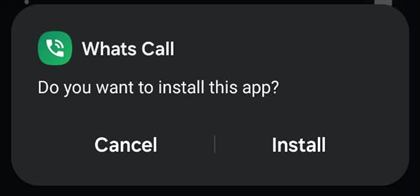
1) Tap “Install” 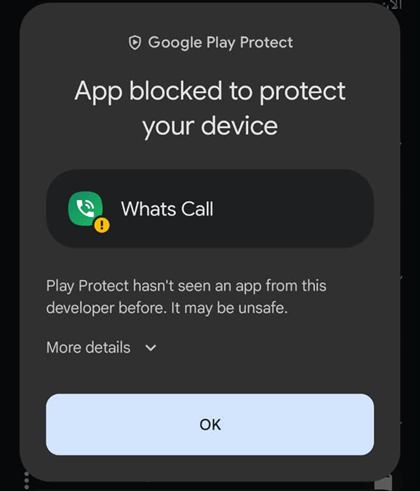
2) If Play Protect appears, tap “More details” 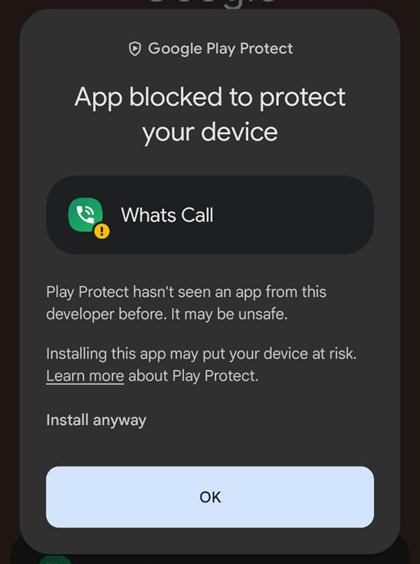
3) Then “Install anyway” - Open the app and accept the disclosure.
It explains what the app processes and what it never collects. Then tap the power button and allow the Android VPN dialog. - Reopen WhatsApp.
Close it completely, open it again and call as usual. A key icon shows at the top while the tunnel is on.
If something goes wrong
“App not installed” or “conflicts with an existing package”
Delete any earlier Whats Call from the phone, then install the new file.
I cannot find “Allow from this source”
Settings → Apps (or Security) → “Install unknown apps” → choose your browser or Files and turn it on. The wording differs a little between brands.
The file downloaded but I cannot find it
Open the Files app → Downloads → tap whats-call.apk.
The app works but the call does not connect
Check it says Connected and the key icon is visible, then force-stop WhatsApp (App info → Force stop) and open it again.
Is the installer file safe?
Download it from this page only, and never from another link or group. The app explains what it processes before first use and asks only for the VPN and notification permissions.
What is WireGuard, and is it safe?
WireGuard is an open-source VPN protocol designed by security researcher Jason A. Donenfeld. It is one of the simplest and newest: its code is short (about four thousand lines in the Linux kernel), which makes it easier for specialists to review, and it has been part of the Linux kernel since version 5.6 in 2020.
It uses well-known modern cryptography: ChaCha20-Poly1305, Curve25519 and BLAKE2s. Many VPN services use it, and it has official apps for Android, iPhone, Windows, Mac and Linux.
Whats Call uses the official WireGuard library for Android; we do not write the encryption protocol ourselves.
What this means for you
- It does not harm your phone: the app asks only for the VPN and notification permissions, and does not read your files, messages or contacts.
- Only WhatsApp uses the tunnel; your other apps do not.
- You are in control: one tap stops the tunnel, and uninstalling removes everything.
To be fair: WireGuard protects the connection between your phone and our server. It does not promise absolute security and does not fix weak internet. The content of your calls and messages is already end-to-end encrypted by WhatsApp.
WhatsApp itself explains the VPN option
In the WhatsApp Help Center, in the article “About connecting to WhatsApp when your network isn’t working”, there is a section titled “Using a VPN”. It says a VPN may let you connect to WhatsApp when it is not available on your current network, that WhatsApp’s end-to-end encryption stays in place while you use one, and it reminds you to be aware of the laws and regulations that apply where you live.
Read the article in the WhatsApp Help Center
This is WhatsApp’s general explanation of the VPN option. WhatsApp does not recommend any specific app and does not endorse Whats Call.
Invite friends, earn free days 🎁
Every user gets a personal invite code inside the app (gift icon at the top). Share it with friends in one tap.
- Your friend gets a free week
They enter your code when they install, so their trial is 7 days instead of 3. - You get a free month
When your friend makes their first paid purchase, 30 days are added to your plan automatically. - Bonus: 7 more days
If 3 of your friends activate the app with your code, you get it once, even before they pay.
Free days start after your current days run out, so none are wasted. Days earned from invites are capped at 180. The reward is granted only on a friend’s first real payment.
Why you can trust it
- WhatsApp onlyBanking, shopping and all other apps stay outside the tunnel.
- We cannot see your callsWhatsApp encrypts them end to end; we only forward encrypted packets.
- No accountNo name, number or contacts. Your device is a random identifier.
- No ads, no trackingNo analytics and no ads inside the app.
- Modern encryptionWireGuard: fast and light on battery.
- Stop any timeOne tap closes the tunnel; the key icon shows when it is on.
Pricing
Try it free first. Then pick a plan: a single payment that does not renew automatically.
- YearlyBest value365 days99 SAR≈ 8.25 SAR / month · save 45%
- Monthly30 days14.99 SAR
Prices include VAT. One plan covers your device. Invite friends: they get a free week and you get a free month when one subscribes.
Start the free trialFAQ
Will it slow my phone or internet?
No. The tunnel carries WhatsApp traffic only; everything else goes directly.
Can you read my messages or calls?
No. WhatsApp encrypts them end to end before they reach us and we do not log your activity.
What data do you process?
A random device identifier, your trial or plan status, your IP address while connected, and the payment reference. No name, number or email. Details are in the privacy policy.
Why install outside Google Play?
So you get it right away. The installer is signed by Next Digital; download it from this page only.
Does it work on iPhone?
Android only for now.
What if I change phones?
Contact support with the invite code shown in the app and we move your plan to the new phone.
Does it renew automatically?
No. You pay once for the plan duration and choose whether to renew when it ends.
Need help?
We reply on WhatsApp during working hours.
Contact supportHelpful guides
In your language
العربية · English · اردو · हिन्दी · বাংলা · Filipino · Indonesia · മലയാളം